

AI for Engineering Knowledge Management
Honest comparison of sketch-to-3D CAD tools. Most text-to-CAD promises don't match reality. Learn which tools mechanical engineers actually use in production workflows.
·
⏱
9 min read

Dr. Maor Farid
Maor Farid is the Co-Founder and CEO of Leo AI, the first AI platform purpose-built for mechanical engineers. He holds a PhD in Mechanical Engineering and completed postdoctoral research at MIT as a Fulbright fellow. A Forbes 30 Under 30 honoree and former AI researcher and Mechanical Engineer in an elite military intelligence, Maor leads Leo AI's mission to transform how engineering teams design better products faster.
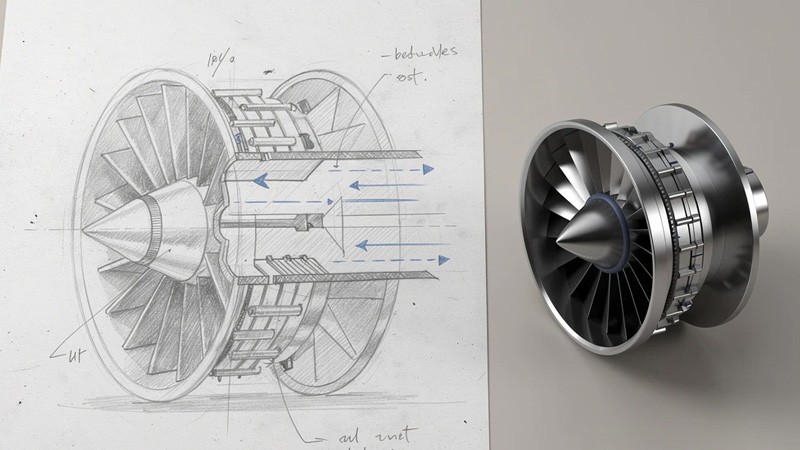
BOTTOM LINE

What it claims: Generate 3D models from text, images, or sketches.
What it actually does: Generates mesh models primarily aimed at game development, animation, and creative visualization.
The reality check: Tripo is not a CAD tool. It generates mesh models for gaming and creative applications. The outputs are not dimensionally accurate and are "best viewed as concept art rather than functional designs."
Their own documentation and reviews confirm: "approximately 1 in 10 generations are client-ready without manual cleanup" and it "struggles with complex multi-part assemblies or precise engineering tolerances."
This is a 3D asset tool for artists and game developers. If you're trying to manufacture something, this isn't the tool.
Best for: Game assets. Animation. Creative 3D visualization.
Converting a hand-drawn sketch or legacy 2D drawing into a usable 3D CAD model sounds straightforward. At least until design intent gets lost in translation. For mechanical engineers and product designers, the real challenge isn't generating geometry. It's ensuring the converted model accurately reflects dimensional relationships, tolerances, and functional constraints embedded in the original drawing.
The AI hype in this space is loud. Really loud. Every other week there's a new text-to-CAD tool promising to "revolutionize" how engineers work. But here's what nobody wants to talk about: most of these tools produce results that can't survive contact with real manufacturing requirements.
I've spent time digging into what actually works versus what makes good LinkedIn posts. The findings weren't what most marketing materials would have you believe.
The Reality Gap Between Promise and Production
When Xometry, a major manufacturing marketplace, tested seven text-to-CAD tools in August 2025, their findings were sobering:
For simple parts (a 20mm cylinder with specified diameters), some tools performed reasonably well.
For medium complexity (a 24-tooth gear with specific parameters), most tools failed to produce accurate models.
For high complexity (a manifold block with internal channels), the tools either produced simplified approximations or couldn't generate results at all.
Their conclusion? These tools "aren't yet a substitute for professional CAD software." The biggest limitations: lack of control, inconsistent file exports, and minimal support for complex assemblies or functional constraints.
This matches what I hear from mechanical engineers on Reddit and engineering forums: "I don't see this being faster than just doing it yourself. A lot of parts are highly complex and require high precision to work with the other parts."
IN PRACTICE
CADScribe
"The connection to our PDM and using that as a data source is legit the best thing ever. I found three viable bracket options fitting my exact envelope constraints — in minutes, not days."
— Eytan S., R&D Engineer
Why Text-to-CAD Tools Struggle With Real Engineering
The core problem isn't that AI is bad at geometry. It's that manufacturing tolerance is unforgiving.
According to MIT researchers working on VideoCAD, current text-to-CAD models operate on visual inputs around 224x224 pixels. They struggle with the sub-millimeter precision required for aerospace or medical devices. The difference between 10.0mm and 10.05mm is the difference between a working part and scrap metal.
The complexity ceiling is also low. Most training datasets focus on single parts with sequences around 186 steps. A real-world engine assembly has thousands of parts and millions of interaction steps. Current text-to-CAD technology simply cannot maintain context over that horizon.
And then there's the software lock problem. Most of these tools generate meshes or simplified geometry that can't integrate with your existing CAD history tree. You get a "dumb solid" with no parameters, no editability. If you need to change the diameter of a hole, you're often stuck manually patching a mesh.
1) Leo AI - The Only Tool With Real Enterprise Adoption

Leo AI takes a fundamentally different approach. Instead of trying to generate geometry from text prompts (which traditional CAD tools already do well), Leo works as an engineering copilot that understands context.
Who's actually using it: HP, Scania, Intel, Mobileye, and over 60,000 engineers across enterprise organizations. It's distributed through value-added resellers in the US, UK, India, France, Germany, Poland, Benelux, and Israel.
What it actually does:
Generates 3D mesh concepts from sketches, specs, text descriptions, and requirements in under 50 seconds
Produces complete engineering documentation: BOM, statement of work, manufacturing methods, quality assurance tests
Answers technical questions grounded in your organization's actual data and 1M+ trusted engineering sources
Finds relevant parts from your PLM and 120M+ vendor parts using natural language
Runs engineering calculations with full traceability to trusted sources
The key difference: Leo is built on a proprietary Large Mechanical Model (LMM) trained specifically on mechanical parts, assemblies, and engineering logic. It understands CAD geometry, tolerances, and constraints in ways that generic AI models fundamentally cannot.
Measurable results from real deployments:
34% reduction in design errors
32% increase in part reuse
12 hours saved per engineer per week
The security piece matters: SOC 2 certified, GDPR compliant, with zero training on customer data. For enterprise engineering teams, IP protection isn't optional.
Best for: Enterprise engineering teams who need production-ready AI that integrates with existing workflows.
FAQ
Stop Wasting Hours on Manual CAD Search
Leo AI turns your existing vault into a searchable knowledge base.
Leo AI connects to your PDM and makes every part findable by description in under 10 seconds. <a href="/onboarding">Try Leo Today</a>
Schedule a Demo →

#1 New AI Software Globally - G2 2026

Enterprise-grade security

Trusted by world-class engineering teams



Stop Wasting Hours on Manual CAD Search
Leo AI turns your existing vault into a searchable knowledge base.
Leo AI connects to your PDM and makes every part findable by description in under 10 seconds. <a href="/onboarding">Try Leo Today</a>
Schedule a Demo →
#1 New AI Software Globally - G2 2026
Enterprise-grade security
Trusted by world-class engineering teams